Failover Weekly No. 18
When Your Load Balancer Stops Trusting Its Own Health Checks
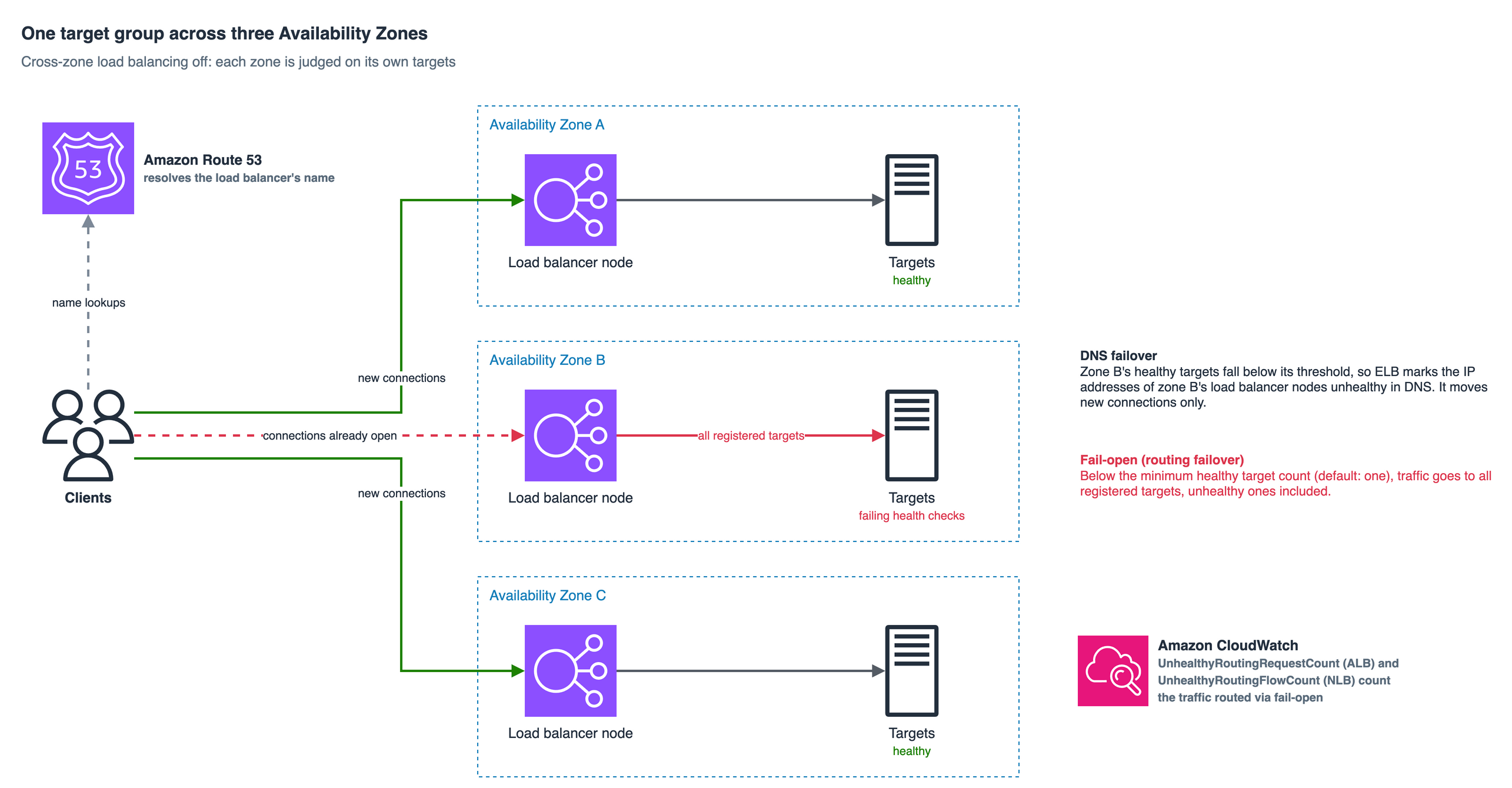
Your load balancer’s health checks are not a kill switch for a failing fleet. By default, when a target group looks entirely sick, Elastic Load Balancing stops filtering and sends traffic to every host it has — and that default is both more defensible and more dangerous than most teams realize.
The night the health checks lied — and why they were right to
A payments platform I sat with — a composite of a few engagements, the identifying details filed off — had done everything the runbook asked. Three Availability Zones. Health checks on every target. Dashboards the color of spring.
Then one Availability Zone (AZ) started to gray out. Not a clean failure. Those are easy. This was the ugly kind: elevated latency, packet loss on a subset of hosts, a downstream dependency timing out intermittently. Their targets began failing health checks in ones and twos, then in tens. The on-call engineer watched the healthy-host count in that zone slide toward zero and felt a familiar relief. The load balancer will pull them. Traffic shifts to the other two zones. We ride it out.
Except the error rate did not fall. It climbed. Customers were hitting the very hosts the dashboard was flagging as unhealthy. The engineer’s mental model — health checks remove bad targets, always — had just collided with a behavior nobody on the team had ever configured, because nobody had ever known they needed to.
The Elastic Load Balancing (ELB) target group had failed open.
I want to unpack that behavior, because it is one of the most misunderstood safety mechanisms in the AWS networking stack, and the misunderstanding runs in a dangerous direction. People assume it does less than it does. It actually does something quite deliberate, and once you see why, you will configure your load balancers differently tomorrow…
Fail open is a choice, and the default already made it for you
Here is the behavior, stated plainly. When the number of healthy targets in an ELB target group falls below a configured threshold, the load balancer does not keep starving traffic down to the last survivor. Instead it triggers what AWS calls the routing failover, or fail-open, action: it sends traffic to all registered targets in that group as if they were all healthy — unhealthy ones included.
Read that twice. At the extreme of unhealthiness, the load balancer stops trusting its own health checks.
This is not a bug. It is a bet, and it is usually the right bet. The logic is that when your whole fleet is failing health checks, the most likely explanations are not “every host is genuinely dead.” They are “a shared dependency is flaking,” “the health check endpoint itself is what broke,” or “you are one bad deploy away from a self-inflicted total outage.” In those cases, sending some traffic to marginal hosts — hosts that can still serve a fraction of requests — beats sending traffic to nothing and returning a hard failure to every customer. Fail-open trades a clean 100 percent failure for a messy partial success. For most workloads, messy partial success is the better Tuesday.
But defaults have consequences, and this one has a sharp edge.
One healthy target is not a quorum — it is a floor
The threshold that governs fail-open is the minimum healthy target count, and by default that count is one. For both Application Load Balancer (ALB) and Network Load Balancer (NLB), the fail-open action only fires when the target group has zero healthy targets.
That default is worth sitting with. It means that with everything left as it ships, your load balancer will happily route to a single surviving healthy host, no matter how overloaded, until that last host also fails a check — and only then does it flip to sending traffic everywhere. There is no built-in notion of “half my fleet is gone, something is systemically wrong, change behavior now.” The line is drawn at the very bottom.
For a lot of architectures that is fine. For a payments platform doing thousands of transactions a second, one healthy target is not resilience. It is a countdown.
You change this with two independent knobs, and the fact that they are independent is the whole point. AWS exposes them as target group attributes, and they read exactly as they behave:
Fail-open (routing) threshold — when to stop trusting health checks
target_group_health.unhealthy_state_routing.minimum_healthy_targets.count        # default: 1
target_group_health.unhealthy_state_routing.minimum_healthy_targets.percentage   # default: off
DNS failover threshold — when to pull the zone out of DNS
target_group_health.dns_failover.minimum_healthy_targets.count                   # default: 1
target_group_health.dns_failover.minimum_healthy_targets.percentage              # default: off
You can express the floor as an absolute count or as a percentage of registered targets, and you can set both — whichever threshold is crossed first wins. A target group that scales elastically almost always wants the percentage. “At least forty percent of my targets must be healthy” survives a scale-out from ten hosts to two hundred; “at least four healthy hosts” does not.
Notice there are two families of attributes here, not one. That is not redundancy. It is the part everyone misses.
DNS failover — the safety net with holes in it
The second knob, DNS failover, is a different and complementary action. When the healthy targets in a zone fall below its threshold, ELB marks the IP addresses of that zone’s load balancer nodes as unhealthy in DNS. Clients that resolve the load balancer’s name afterward are handed only the healthy zones. It is Amazon Route 53 quietly steering new connections away from the sick AZ at the name-resolution layer.
This is the mechanism most engineers assume is always protecting them. It is genuinely powerful — but it protects you only within its boundaries, and the boundaries are where incidents live.
First, DNS failover needs at least two zones to fail over between. Pull the last healthy zone out of DNS and you have resolved your load balancer’s name to nothing, which is a worse outage than the one you were managing. So the system will not remove your last standing zone. Sensible — but it means DNS failover is a mechanism for shedding a minority of bad zones, not a mechanism for surviving a majority-down event.
Second, and this is the one that burns people, DNS failover only helps clients that re-resolve. The ELB name is published with a short time-to-live, but a short TTL is not a zero TTL. Client-side resolvers cache. Application runtimes cache, sometimes far longer than they should and occasionally forever if the process resolved once at startup and never again. Long-lived connections — a connection pool, a persistent gRPC channel, a database-style keepalive — do not re-resolve at all until they are torn down. Pull a zone from DNS and every one of those clients keeps hammering the address it already holds. DNS failover moves new connections. It does nothing for the connections you already have, and in a gray failure the connections you already have are exactly the problem.
That is why the two knobs exist separately. DNS failover reduces the new traffic aimed at a bad zone. Fail-open governs what happens to the traffic that arrives anyway. You want to reason about both, deliberately, rather than inherit a floor of one for each and hope.
Cross-zone load balancing quietly changes the math
There is a third actor in this story, and it rewrites the arithmetic of every threshold above: cross-zone load balancing.
With cross-zone load balancing disabled, each load balancer node distributes traffic only to targets in its own AZ. Thresholds are therefore evaluated per zone. If zone B’s local targets drop below your percentage, zone B is judged unhealthy — cleanly, locally, the way your mental model expects.
With cross-zone load balancing enabled, every node can send traffic to every registered target across all zones, and the health thresholds are evaluated across that combined pool. Now picture a target group with plenty of healthy hosts in zones A and C, and a completely dead zone B. Across the whole pool you are still comfortably above your healthy percentage. So the load balancer sees no reason to act. DNS failover does not trigger. Fail-open does not trigger. The aggregate looks fine while one AZ is a smoking hole — and nothing in target group health pulls the dead zone’s load balancer node out of DNS.
The defaults matter here too, and they differ by load balancer type. ALB has cross-zone load balancing always enabled at the load balancer level; you can only disable it per target group. NLB and Gateway Load Balancer ship with it disabled. So two teams can configure identical health thresholds and get entirely different failure behavior purely because one is fronting with an ALB and the other with an NLB. If you have ever wondered why a zonal fault expressed itself so differently across two services in the same account, this is often the reason.
None of these settings is wrong. But they compose, and the composition is where the surprise lives. A per-zone percentage floor behaves one way under cross-zone-off and a materially different way under cross-zone-on, and nobody tells you at 2 a.m.
What target group health does not do
Let me be explicit about the boundary, because the honest boundary is the whole value of understanding this at all.
Target group health thresholds do not detect gray failure. They count health checks. If your health check is a shallow TCP handshake or a 200 OK from a health route that never touches the failing dependency, a host can be brown-out slow, dropping one request in three, and still pass every check. It stays in rotation. Fail-open and DNS failover never trigger, because by their measure nothing is unhealthy. Your thresholds are only ever as honest as the check behind them.
They do not fix an overloaded fleet. Fail-open explicitly sends more traffic to targets that are already struggling. If the root cause is saturation rather than a transient dependency blip, failing open pours fuel on it. This is a mechanism for surviving false or transient unhealthiness, not for surviving genuine capacity collapse.
They do not move existing connections, as we saw. And they are not a substitute for capacity you do not have. If losing one AZ leaves you without enough headroom to serve the shifted load, no threshold setting saves you — you have a capacity-planning problem wearing a load-balancer costume.
What these settings give you is a small, precise amount of control over one question: at what point does my load balancer stop trusting its health checks, and how loudly does it tell me? Amazon CloudWatch answers the second half. UnhealthyRoutingRequestCount on an ALB and UnhealthyRoutingFlowCount on an NLB count exactly the traffic that is being routed via fail-open. A nonzero value there is your load balancer confessing that it no longer believes its own health data. If that metric is not on a dashboard and wired to an alarm, you are flying open and blind at the same time.
The lesson beyond load balancers
Strip away the ELB specifics and the pattern is general. Every resilience mechanism you inherit has a default posture, and that posture encodes an assumption about what failure looks like. Fail-open assumes your failures are transient and shared. Fail-closed assumes they are real and local. Neither is correct in the abstract — each is correct for a particular failure mode — and the default was chosen by someone who could not see your workload.
The mistake is not picking the wrong posture. The mistake is not knowing a posture was picked. The payments team did not choose fail-open with a floor of one; they simply never chose anything, and a reasonable default chose for them at the worst possible moment. Resilience engineering is, more than anything, the discipline of dragging those inherited assumptions into daylight and asking whether they match the way your particular system actually breaks. Read the default. Name the assumption behind it. Decide, on purpose, whether it is yours.
The failover you never configured will still run. It just runs on someone else’s guess about your architecture.
What’s next
Next week I want to go one layer down, to the check itself: how to design a health check that actually detects the failures that matter, why deep checks and shallow checks want different thresholds, and how an overeager health check can take down a healthy fleet all by itself — the self-inflicted outage where the safety mechanism is the incident.
Get Failover Weekly by email
One essay every two weeks, plus a short note when a new article is published here.