Failover Weekly No. 5
Resilience Migration Advisor
A Zero-Backend Tool for DR Planning That Keeps Control in the Customer’s Hands
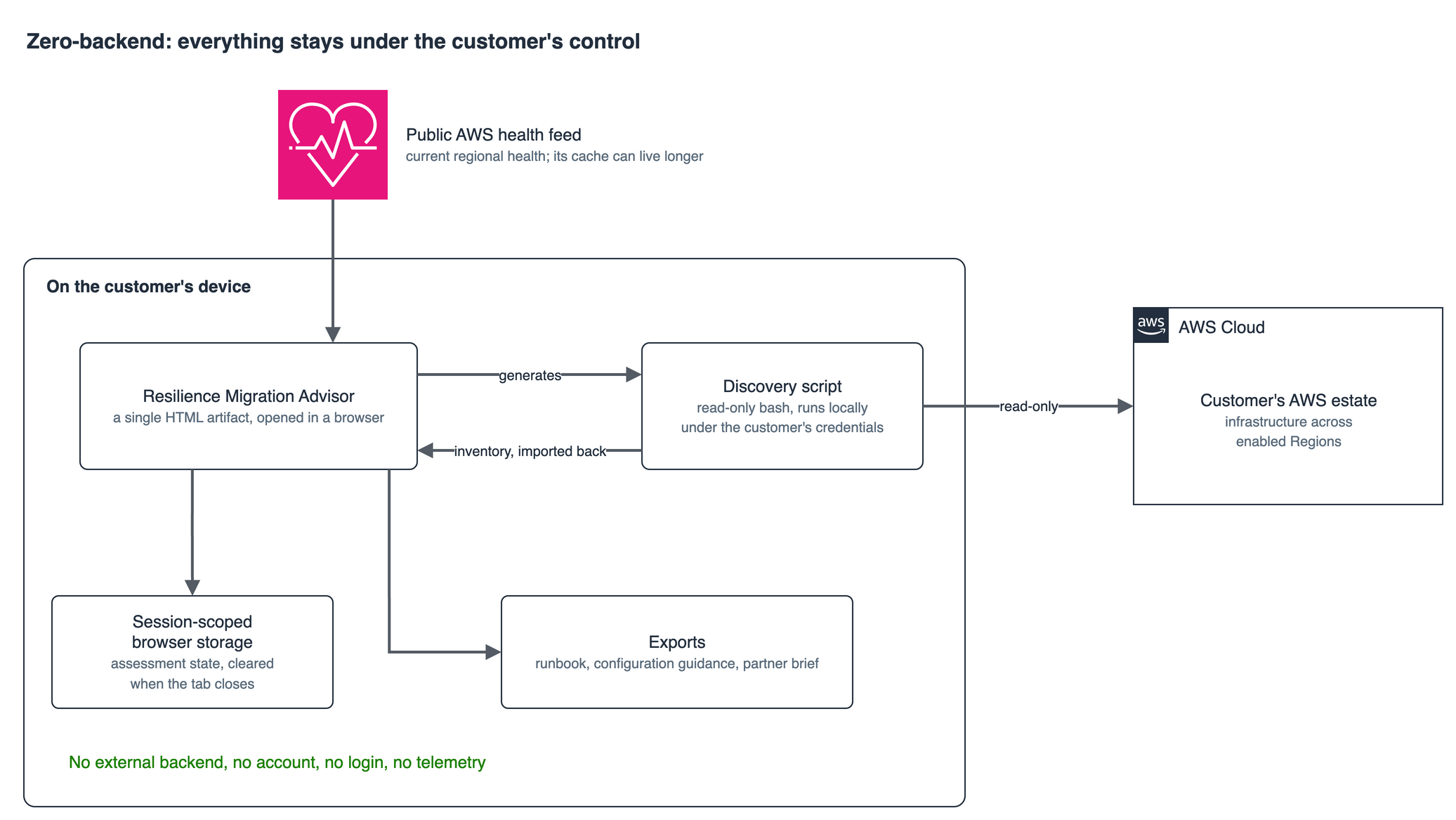
Most resilience assessment tools start with the same broken assumption: upload your architecture into someone else’s SaaS so their backend can tell you how to recover. That model introduces a new dependency, a new blast radius, and a new disclosure surface into the very workloads you are trying to protect.
This is the problem that pushed me to build the Resilience Migration Advisor, now available through AWS Labs at https://github.com/awslabs/resilience-migration-advisor. It is a locally guided facilitation tool built for crisis response and strategic resilience planning. It runs on-device, does not require cloud connectivity to operate, and does not send your assessment data to an external backend. Everything happens client-side. Everything stays under your control.
In this issue I want to explain why a zero-backend architecture is the right model for resilience tooling, what Resilience Migration Advisor actually does, and how it can be used in both active disruption scenarios and proactive resilience engagements.
The problem with backend-heavy resilience tooling
Resilience assessment is not just a technical workflow. In regulated industries it is also evidence. The output of a DR assessment can end up in audit packages, internal risk committees, regulator discussions, or board-level resilience reviews. If the way you generate that evidence depends on pushing a detailed inventory of your AWS estate into a third-party service, you have already changed the risk model before the assessment even begins.
First, you complicate data residency and handling. The assessment payload now sits on infrastructure you do not control, subject to someone else’s retention policy, operational model, and subprocessor chain.
Second, you create a supply-chain dependency for your own resilience posture. If the SaaS is unavailable during an incident, the planning tool you depended on is itself down when you need it most.
Third, you are disclosing a high-value architectural map to an external platform: workloads, dependencies, recovery objectives, critical services, and failover assumptions. That is not lightweight metadata. It is a blueprint of the environment you are trying to defend and recover.
For resilience tooling, the architecture of the tool matters as much as the output it generates.
What Resilience Migration Advisor does
Resilience Migration Advisor is delivered as a single HTML artifact. You open it in a browser and use it immediately. There is no installation process, no account creation, no login, and no telemetry pipeline.
It is designed to help customers, partners, TAMs, SAs, PSAs, and account teams move from planning paralysis to a clear path forward. The tool was built to accelerate workload evacuation during regional disruptions, but it is equally useful for proactive resilience planning before a crisis occurs.
The tool starts with a guided assessment. It walks through workload profile, services in scope, RTO and RPO requirements, compliance and data sovereignty constraints, current DR posture, and operating model. That assessment is then used to generate tailored outputs rather than generic guidance.
One of the most valuable outputs is recovery guidance that becomes actionable. Resilience Migration Advisor generates customer-specific runbooks with AWS CLI-based action steps, pre-evacuation checklists, recommended services and patterns, validation criteria, and exportable configuration artifacts. The goal is not to automate the migration itself. The goal is to eliminate planning ambiguity and compress hours of coordination into minutes.
The tool also includes environment discovery. For customers who want recommendations grounded in what is actually deployed, the browser can generate a read-only bash discovery script. That script runs locally, under the customer’s credentials, and inventories infrastructure across enabled regions. It produces a dependency-aware view of the environment that can be imported back into the browser for more accurate planning. The inventory remains local. It is not sent to an external service.
Resilience Migration Advisor also generates architecture guidance. In Architecture Strategy mode, it can produce target region recommendations, tailored disaster recovery patterns, migration wave plans, DNS routing strategies, and architecture visualizations for canonical DR approaches such as Backup and Restore, Pilot Light, Warm Standby, and Active/Active.
Another major capability is partner engagement. The tool includes both Regional Partner Assistance and Partner Matchmaking paths. Partner Matchmaking uses a weighted scoring model based on workload profile, urgency, complexity, and specialization to identify the most relevant AWS partner. The current ecosystem includes 18 partners.
For high-pressure situations, the tool includes an Immediate DR path. This is designed for customers who cannot afford lengthy planning cycles and need to connect quickly with specialized DR tooling partners such as ControlMonkey, N2W, and Firefly. The intent is speed. Minimal assumptions, minimal questioning, immediate direction.
The four operating modes
The tool presents two top-level paths.
Path A is “I want to execute recovery myself.”
Path A1 is Immediate DR. This is the fastest path for customers who need urgent help and want to move directly toward a recovery motion with specialized DR partners.
Path A2 is Architecture Strategy. This is the strategic planning path. It is used to assess the workload, recommend the best-fit target region, choose a resilience pattern, and generate the tailored runbook and configuration package.
Path B is “I want help from AWS partners.”
Path B1 is Regional Partner Assistance. It gives immediate access to the local partner ecosystem with a lightweight preparation flow.
Path B2 is Partner Matchmaking. It uses the structured assessment to identify the best-fit partner and generate a partner-ready engagement brief.
This matters because not every customer is in the same place. Some are in the middle of an incident. Some are planning ahead. Some need a rapid exit path. Others need architecture strategy and partner alignment. The tool provides multiple paths instead of forcing one operating model onto every scenario.
Why the architecture matters
Three design choices in Resilience Migration Advisor are worth calling out because they apply more broadly to any resilience tooling team might build.
The first is client-side processing. In resilience assessment, a browser-first approach is not a compromise. It is often the correct architecture. A tool with no backend removes an entire class of data handling and service dependency risks.
The second is explicit storage boundaries. Assessment state lives in session-scoped browser storage and is cleared when the tab closes. Public AWS health feed caching can live longer, but customer-derived assessment data should not persist beyond the session unless the user explicitly exports it.
The third is local discovery instead of a federated trust model. The environment discovery script runs under the customer’s control with read-only credentials. There is no external vendor account to trust and no cross-account IAM role to provision for the tool.
How to use it in practice
Using the tool is straightforward.
-
Download the HTML artifact from the repository.
-
Open it in a browser.
-
Review current AWS regional health inside the tool.
-
Choose the path that matches the customer situation.
-
Complete the guided flow or take the immediate-result option depending on mode.
-
Export the runbook, configuration guidance, or partner brief.
For a grounded-in-reality assessment, generate the discovery script, run it locally, and analyse the resulting inventory.
In practice, this means a medium-sized DR planning engagement can go from fragmented conversations and documentation hunting to a concrete, workload-specific output in a single working session.
What the tool is and what it is not
Resilience Migration Advisor is an accelerator and facilitator. It is not an automated migration engine. It does not replace AWS Support. It does not replace a qualified migration or DR partner. It does not guarantee zero downtime.
What it does do is give customers and field teams a structured way to answer the questions that matter during a disruption or proactive resilience review:
-
Where should we move?
-
How should we move?
-
Who should we engage?
-
What exact steps should we take next?
That sounds obvious, but in real incidents those four questions are where time disappears.
Why this matters beyond crisis response
The immediate use case is regional disruption response, especially in situations where customers need to evacuate workloads quickly and still respect data residency, latency, and regulatory constraints.
But the more strategic use case is proactive resilience planning. Architecture Strategy mode lets customers build disaster recovery runbooks before a crisis. That is the real gap this tool fills. There is no shortage of AWS resilience guidance. What has been missing is a structured way to turn that guidance into workload-specific, executable outputs that teams can actually use.
That is why I do not think of Resilience Migration Advisor as just an incident tool. It is a mechanism for improving resilience posture over time. It can support unaffected customers preparing ahead of possible disruptions. It can support global customers improving resilience posture. It can support TAMs, SAs, PSAs, and partners in proactive reviews and resilience practice development.
The uncomfortable truth
For years, the industry has pulled resilience tooling toward more SaaS, more centralization, and more dependency on vendor backends. That may be convenient for analytics pipelines, but it is often the wrong posture for disaster recovery planning.
The work you do to prepare for recovery should not require surrendering the architectural blueprint to a third party. A zero-backend model is not a gimmick. For resilience assessment, it is often the correct architecture.
Resilience Migration Advisor was built from that premise. It is lightweight, local, crisis-ready, and equally valuable for long-term resilience planning. It operationalizes the message every architect eventually has to answer under pressure: move the workload to a healthy region, choose the right pattern, engage the right partner, and do it fast.
You can explore the project here:
https://github.com/awslabs/resilience-migration-advisor
You can access the online training course on AWS Skill Builder here:
If you are working on resilience architecture, DR planning, regulated workload recovery, or partner-led resilience engagements, I would love to hear how you would extend it.
Get Failover Weekly by email
One essay every two weeks, plus a short note when a new article is published here.