Six Security Groups, No Context: What Transit Gateway's Gateway Load Balancer Attachment Actually Changes
Transit Gateway can now plug straight into a Gateway Load Balancer and tell your firewall which VPC, subnet and security groups a packet came from. The plumbing it removes is real. The limits it adds decide whether your segmentation rules still match on the day a workload changes.
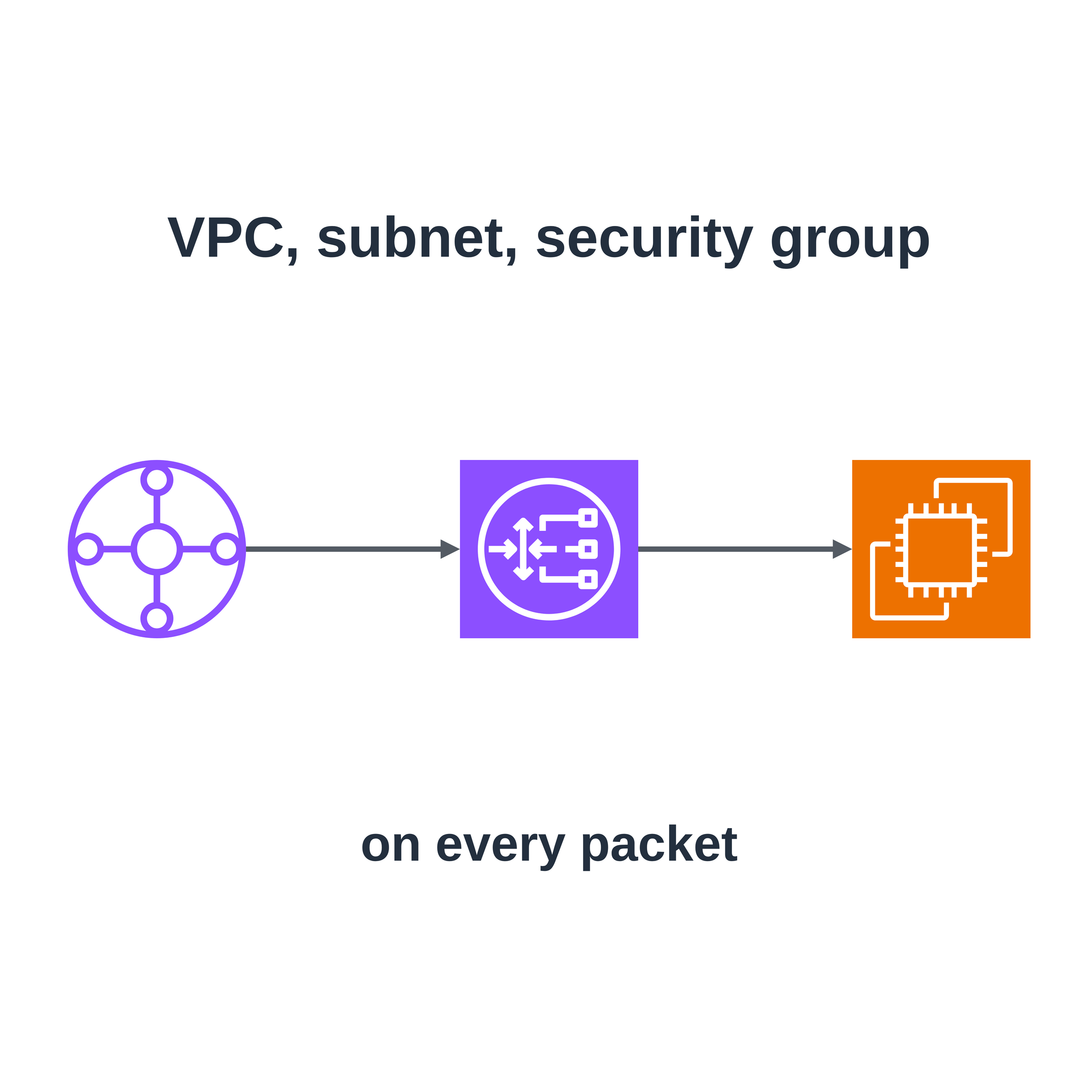
Give a workload five security groups and your firewall knows exactly what it is. Give it a sixth and, as far as the firewall’s security-group rules are concerned, it is nobody at all.
That is not a bug report. It is one line in the documentation of a launch AWS shipped on 17 November 2026: Transit Gateway network function attachments of type Gateway Load Balancer, and with them, context sharing with security services. The headline is plumbing: your third-party firewall fleet behind a Gateway Load Balancer connects to Transit Gateway directly, with no inspection VPC routing to build. The more interesting half is that Transit Gateway now stamps each packet with where it came from, so the firewall can write policy against a VPC or a security group instead of an IP address.
The second half changes what “my firewall rule matched” means. That is worth slowing down for.
The problem: policies written in a language that keeps changing
Centralised inspection on AWS has always meant two jobs.
The first is the plumbing. The classic design is an inspection VPC: a Transit Gateway attachment in it, Gateway Load Balancer endpoints in dedicated subnets, route tables in every Availability Zone that send traffic from the attachment to the endpoint and back, and appliance mode on the attachment so that Transit Gateway “uses the same Availability Zone for that VPC attachment for the lifetime of a flow of traffic between source and destination”, which is what a stateful firewall needs to see both directions of a conversation. Every piece of that is yours to build, and every piece is a place for a change to go wrong.
The second job is the policy, and here the problem is the language. Most firewall rules are written in IP addresses. AWS’s own launch post names the cost: enterprises that rely only on IP addresses “must keep rules or address groups current”, and as workloads move and addresses change, that “often requires coordination across network, application, and security teams.”
The workloads that hurt most are the short-lived ones. AWS names them: an
ECS task in awsvpc mode, an EKS pod that uses security groups, a
VPC-attached Lambda function, any of which “might begin sending traffic
before the next synchronization update reaches the firewall.”
The challenge: synchronisation always lags
The usual answer is to synchronise. Some firewalls periodically pull AWS resource information such as tags and map it to IP addresses; other teams write automation that pushes updated address lists. AWS’s verdict on both is fair: they reduce manual updates, “but a synchronization gap can remain.”
That gap is a resilience problem as much as a security one. A rule that has not caught up either blocks a workload it should allow, which looks like an outage, or allows one it should block, which nobody notices. Polling faster narrows the window. It does not close it.
What you actually want is for the network to tell the firewall, packet by packet, what the source is.
The solution: an attachment, a context store and 24-bit IDs
The attachment
A network function attachment of type Gateway Load Balancer connects a transit gateway to the Gateway Load Balancer VPC endpoint service that fronts your firewall deployment. You choose the endpoint service and up to 16 Availability Zones; Transit Gateway “creates one Gateway Load Balancer endpoint in each Availability Zone you select”, and the Transit Gateway guide says it “enables appliance mode automatically.” AWS’s summary of what goes away: “no endpoint subnets, endpoint route tables, or inspection VPC attachment to build and maintain.”
The appliances themselves do not move. The Gateway Load Balancer, its
targets and the endpoint service stay where your security team runs them,
and the endpoint service can sit in another account. In that case the
endpoint service owner has to grant the transit gateway owner’s account the
transit-gateway-attachment permission type, which “supports only an AWS
account principal, specified using its root ARN.” If the endpoint service
requires acceptance, the attachment waits in pendingAcceptance until its
owner accepts.
Routing is deliberately simple. Network function attachments “support transit gateway route table associations and static routes” and do not support route propagation. AWS’s walkthrough uses two route tables: a spoke route table, associated with the VPC attachments, with a static default route (0.0.0.0/0 and ::/0) to the network function attachment; and a post-inspection route table, associated with the network function attachment, with routes back to every workload VPC.
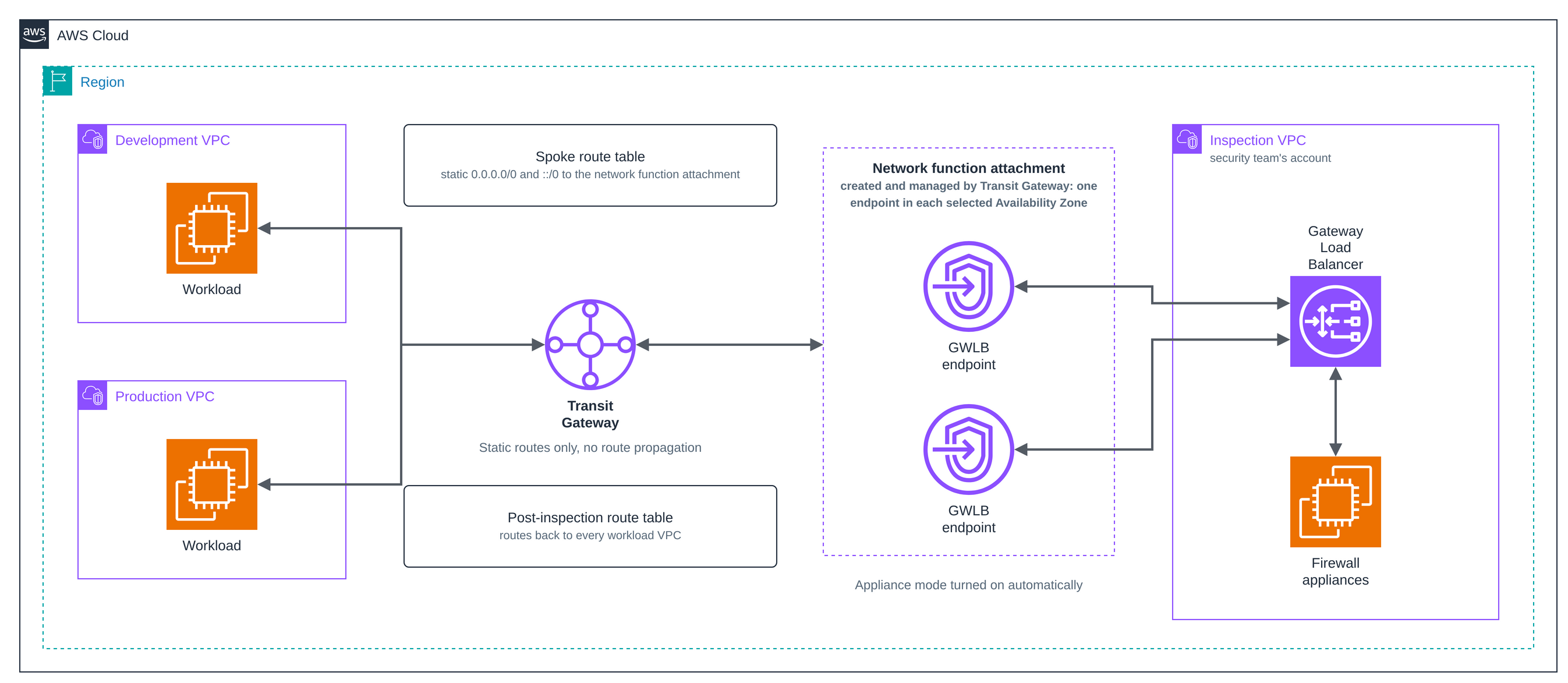
The inspection VPC’s routing is gone. The firewalls, and their account, stay where they were.
The context
Context sharing is set up on the network side, in AWS Network Manager. You create a context store in a global network, associate the transit gateway with it and give the firewall access to the store. A context store “monitors context for resources connected to associated transit gateways and shares that context with security services.”
From there AWS describes two paths that meet at the firewall:
- The data path. Transit Gateway “adds a compact context ID of the source resource to each packet.” In the Geneve header that the Gateway Load Balancer already uses, a new option, Type 22, carries the context store ID and 24-bit context IDs for the attachment the traffic entered through, the VPC, the subnet, and up to five security groups, plus the attachment type, Region and Availability Zone.
- The control path. The firewall reads the context store and builds a table that maps each ID back to a resource: this number is that VPC, that number is this security group. It “does not need to call Network Manager for each packet.”
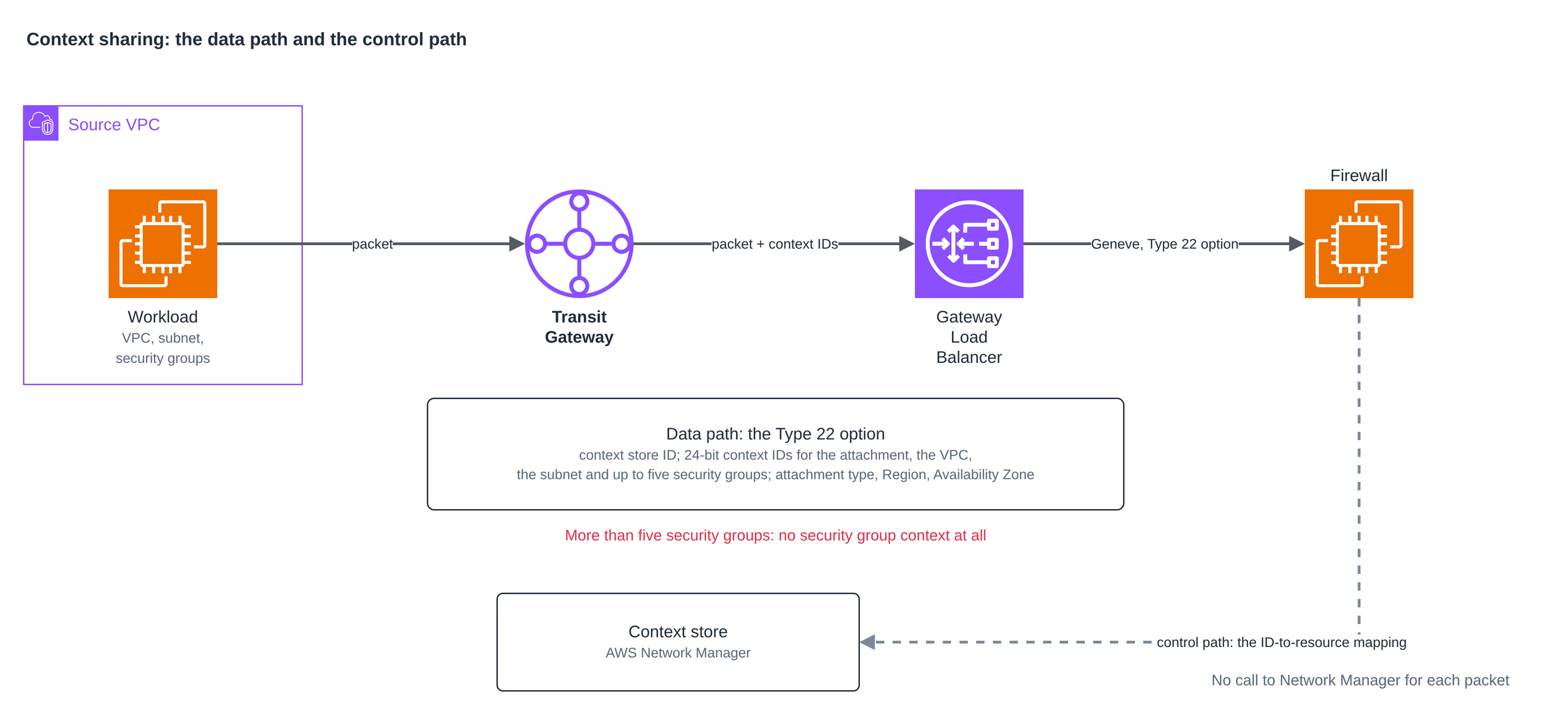
The packet carries numbers. The context store says what they mean.
The result is a rule like AWS’s example: deny traffic whose source is in the development VPC and carries the application security group. Because the rule matches the source’s context, “the segmentation follows the workload. If the instance receives a new IP address, it stays isolated as long as it remains in both the VPC and the security group.” Your IP-based rules keep working alongside it.
The small print: where the context runs out
Every one of the following is documented. None of them shows up as an error.
The sixth security group. Context includes up to five security groups. “If a resource is associated with more than five security groups, its context does not include any security groups.” Not the first five: none. Think about what that does to a rule that matches on a security group. A deny rule stops matching, so the traffic it was written to stop gets evaluated by whatever comes next. An allow rule stops matching too, and the workload loses access. Either way, the change that caused it was someone adding a security group to a workload, in an account the security team may never look at. If you adopt security-group rules, the five-group limit belongs in your guardrails, not in the firewall team’s heads.
Only the source. “As of this writing, only source context is included in the traffic.” A rule about where traffic is going is still an IP rule.
Only between VPCs. Context sharing applies to traffic the transit gateway routes to the firewall, which is traffic between attachments. “Traffic between resources in the same VPC stays inside the VPC and is not inspected.” If you want to write policy between a web tier and a database tier, AWS’s advice is to put the tiers in separate VPCs. That is an architecture decision, not a firewall setting.
Not across Regions. Context “is not shared across inter-Region transit gateway peering attachments.” Across intra-Region peering, it is shared only when both transit gateways are registered in the same Network Manager global network. A global network has one context store, and a transit gateway can be associated with one. Transit gateways in several Regions can share a store, but in a multi-Region design, traffic that crosses a Region boundary is where a context rule stops being something you can count on.
Not with Encryption Support. To create the attachment, Encryption Support must be disabled on the transit gateway; if its state is enabled, enabling or disabling, the request is rejected. The Encryption Support page says the same from its side: network function attachments are not supported with it. If you have been building towards VPC encryption controls, you now have to choose, per transit gateway, between encryption support and this kind of inspection.
Not in one zone. The Availability Zone use1-az3 is not supported.
The failure modes that did not change
The attachment removes the plumbing in front of the Gateway Load Balancer. It does not change how the Gateway Load Balancer treats your appliances, and that is where I would spend the design review.
By default, each Gateway Load Balancer node distributes traffic only across
the registered targets in its own Availability Zone; cross-zone load
balancing is off unless you turn it on. Existing flows “go to the same
target unless the flow times out or is reset, regardless of the health and
registration status of the target”, unless you change the target failover
setting from its default of no_rebalance. And “when all targets are
unhealthy, the Gateway Load Balancer picks a target at random and forwards
traffic to it for the life of the flow”, with the traffic dropped until that
target recovers. I wrote about
what that default does to the connections of an appliance that dies
in September; none of it is undone here.
Put that next to the attachment’s own choice of zones. Transit Gateway
creates an endpoint only in the Availability Zones you select. Which zones
those are, how many appliances sit behind each, and whether cross-zone load
balancing is on, together decide what one impaired zone does to inspected
traffic. The attachment makes those zones one command
(modify-transit-gateway-network-function-attachment) instead of a subnet
project. It does not make the decision for you.
Two operational lines from the documentation deserve a place in the runbook. Before you delete a network function attachment, remove or replace the routes that point at it: “If the routes remain, they enter the blackhole state and matching traffic is dropped.” And moving an existing inspection VPC onto the attachment means changing only the route, but “depending on your inspection architecture, this change can interrupt connections in progress because traffic moves to a different firewall.” AWS recommends a maintenance window. I would take it.
The footprint
Delete the plumbing, keep the design. Endpoint subnets and per-zone route tables were never the hard part of centralised inspection; they were the error-prone part. Letting Transit Gateway own them, with appliance mode switched on for you, removes a class of mistakes. What is left, zone choice and appliance capacity, is the part that was always the real design.
Context is a new dependency, so treat it like one. A rule written against a security group is only as good as the context the packet carries. Five groups is the ceiling, the source is the only side, and the boundary is the Region. Write those down where the people who attach security groups will see them.
Keep the IP rules underneath. AWS positions context alongside IP-based policy, not instead of it. That is the right posture. Context makes the rules follow the workload; addresses are what you fall back to when context is not there.
Mind the encryption fork. If encryption in transit across the transit gateway is a requirement, this attachment is not available on that transit gateway today. Make that decision explicitly, before someone discovers it in a change ticket.
The firewall can finally read the network’s own description of a workload. Just remember it reads at most five security groups of it.